
How to Track Sales Team Performance Without Micromanaging
This blog explains how businesses can track sales team performance without creating pressure or micromanaging reps. It covers the difference between healthy tracking and micromanagement, the importance of automated data collection, and the key metrics managers should monitor, such as lead ownership, response time, follow-up completion, pipeline movement, conversion rate, and revenue progress. The blog also shows how Exenra.ai helps businesses improve team accountability, reduce manual reporting, monitor sales activity, and support better coaching through clear performance visibility.
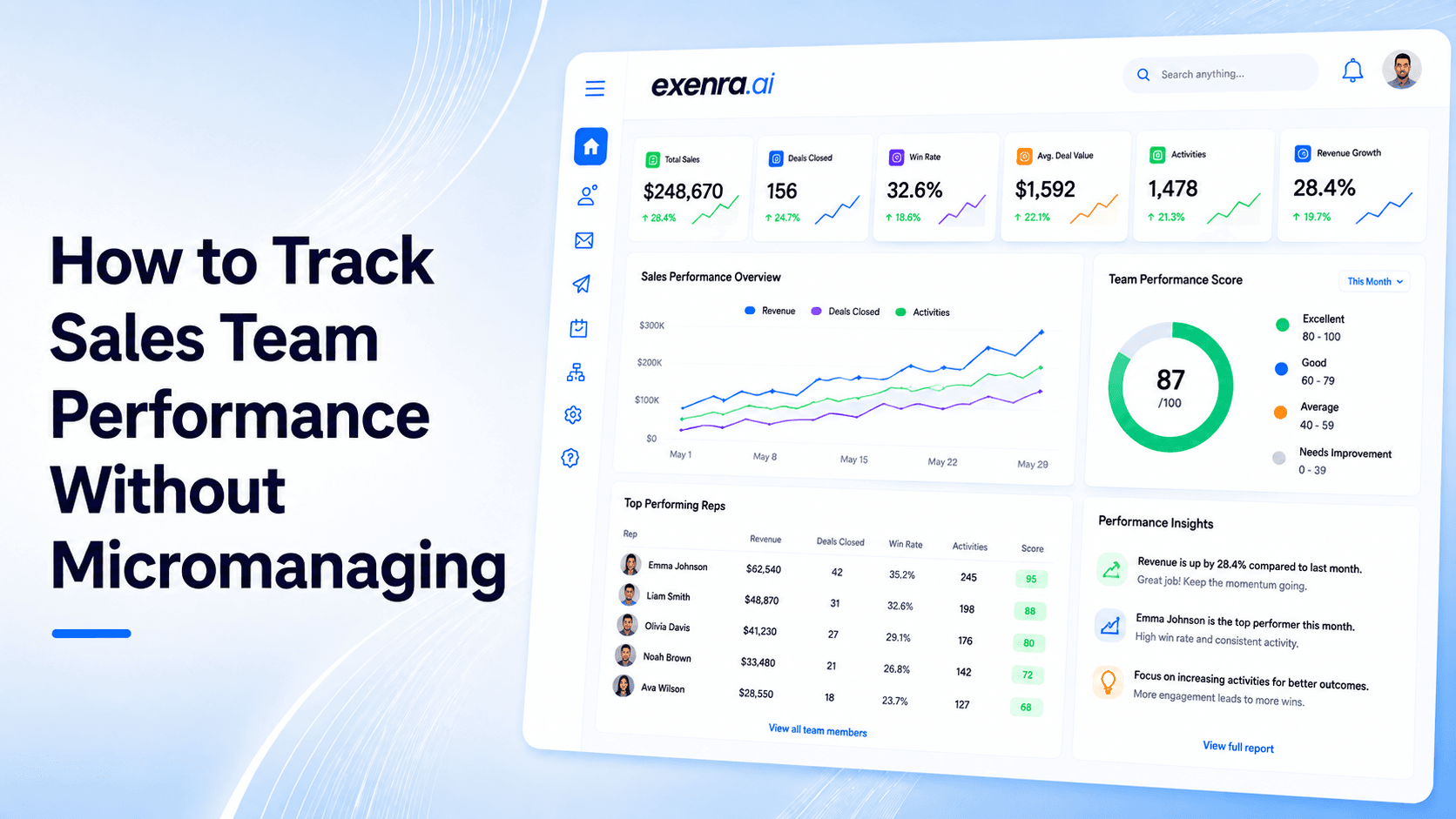
Tracking sales team performance should make your team better, not make them feel watched all day.
Most business owners want visibility. They want to know which leads are being handled, who is following up, which deals are moving forward, and where opportunities are getting stuck. That is completely normal.
The problem starts when tracking turns into constant checking.
If managers keep asking for updates every few hours, sales reps can feel pressured instead of supported. They may spend more time explaining what they did than actually selling. Over time, this can hurt trust, motivation, and performance.
The better approach is simple: track the right data automatically and use it to guide the team, not control them.
That is whereExenra.aihelps. It gives businesses a clearer way to track leads, follow-ups, pipeline movement, team activity, and sales performance without relying on spreadsheets, scattered messages, or constant manual updates.
The Problem: Sales Tracking Can Easily Feel Like Micromanagement
Most managers do not set out to micromanage their teams.
They usually start asking questions because they need clarity.
They want to know:
Did this lead get contacted?
Who is handling this customer?
Why is this deal still pending?
Was the follow-up completed?
Which leads are close to closing?
Why has the pipeline not moved?
How many opportunities are still open?
These are fair questions.
But when the only way to get answers is by messaging the team again and again, sales tracking starts to feel like pressure.
Reps may feel interrupted. Managers may feel frustrated. Business owners may still not have a complete view because updates are spread across chats, calls, spreadsheets, and verbal reports.
That is not healthy performance tracking.
That is manual supervision.
A better system gives managers the visibility they need without forcing the sales team to report every small action manually.
Why Micromanagement Hurts Sales Teams
Sales teams need structure, but they also need trust.
Good sales work depends on confidence, timing, judgment, and ownership. If reps feel like every move is being watched, they may become less independent and less motivated.
Micromanagement can lead to:
Lower morale
More stress
Slower decisions
Less ownership
More admin work
Poor trust between managers and reps
Less focus on customers
Weaker sales conversations
The goal should not be to monitor every action.
The goal should be to make important sales activity visible so managers can support the team, fix gaps, and improve results.
Sales tracking should feel like guidance, not surveillance.
The Solution: Track the Right Metrics Automatically
The best way to track sales team performance without micromanaging is to focus on meaningful metrics.
You do not need to watch every call, every message, or every small task. You need to track the signals that show whether the sales process is working.
A good system should show:
How many leads each rep receives
How quickly new leads are contacted
Which follow-ups are completed
Which follow-ups are overdue
How leads move through the pipeline
Which reps are converting more leads
Which sources bring better opportunities
Why leads are being lost
How much revenue is in progress
Where the sales process slows down
This gives managers useful visibility without constant interruptions.
The most important part is automation.
When your system automatically tracks lead ownership, status changes, follow-ups, and pipeline movement, the sales team does not have to waste time manually logging every update. Managers also do not need to keep asking for progress reports.
That creates a healthier, more productive sales environment.
What Sales Team Performance Tracking Really Means
Sales team performance tracking means measuring how your team handles leads, follow-ups, pipeline stages, customer conversations, and revenue opportunities.
It is not only about counting calls or messages.
One rep may make many calls but fail to move quality leads forward. Another rep may make fewer calls but handle serious opportunities better and close more deals.
That is why good performance tracking looks at both activity and outcomes.
A strong sales tracking process should measure:
Lead response time
Follow-up completion
Pipeline movement
Lead conversion rate
Deal value
Lost lead reasons
Team workload
Lead ownership
Sales cycle length
Revenue contribution
This gives a more complete and fair picture of performance.
Why Automated Data Collection Matters
Manual reporting is one of the biggest reasons sales tracking feels like micromanagement.
If reps have to update spreadsheets, send daily reports, and explain every small task, tracking becomes a burden. It slows the team down and creates frustration.
Automated data collection solves this problem.
Instead of asking reps to manually log everything, your system should collect important updates as part of the normal workflow.
For example:
When a new lead is assigned, the system records the owner.
When a lead status changes, the pipeline updates.
When a follow-up is due, the system shows it.
When a follow-up is overdue, the manager can see it.
When a lead is marked won or lost, the report updates.
When one lead source performs better, the data becomes visible.
This gives managers clear information without putting extra pressure on the team.
It also helps reps focus more on selling and less on admin work.
Use Cases: When Sales Performance Tracking Helps Most
Sales team performance tracking is useful for any business that manages leads, follow-ups, and revenue opportunities.
1. Small Sales Teams
Small teams often rely on a few people to handle all enquiries.
A tracking system helps owners see who is handling each lead, which follow-ups are pending, and where support is needed.
2. Agencies Managing Client Leads
Agencies need to track how their team handles leads for different clients.
A dashboard can show lead ownership, follow-up activity, campaign results, and pending tasks without relying on manual updates.
3. Businesses With Social Media Leads
Leads from Facebook, Instagram, and WhatsApp can move quickly.
Sales tracking helps make sure those leads are assigned, contacted, and followed up with properly.
4. Service Businesses
Service businesses often receive calls, messages, forms, and WhatsApp enquiries.
Tracking helps ensure each enquiry is handled by the right person and followed up on time.
5. B2B Sales Teams
B2B sales usually involve longer conversations, demos, proposals, and multiple follow-ups.
Pipeline tracking helps managers see which opportunities are active, which ones are stuck, and which ones need attention.
6. Remote or Hybrid Sales Teams
When teams are not working in the same office, visibility becomes harder.
A sales tracking system helps managers understand progress without constantly messaging reps for updates.
7. Businesses Running Paid Ads
If your business spends money on ads, you need to know whether those leads are being handled properly.
Tracking shows whether campaign leads are contacted, qualified, followed up with, and converted.
Feature Breakdown: What to Track Without Micromanaging
A good sales performance tracking system should focus on useful metrics, not unnecessary surveillance.
1. Lead Ownership
Every lead should have a clear owner.
This answers one of the most important questions: who is responsible for this opportunity?
Without ownership, leads can easily be ignored.
2. Response Time
Response time shows how quickly your team contacts new leads.
This matters most for leads from ads, social media, forms, and WhatsApp because those customers often expect fast replies.
3. Follow-Up Completion
Many leads do not convert after the first message.
Follow-up tracking helps managers see whether reps are staying consistent without asking them again and again.
4. Pipeline Movement
Pipeline movement shows whether leads are progressing.
Common stages may include:
New lead
Contacted
Interested
Follow-up required
Proposal sent
Negotiation
Won
Lost
If too many leads stay stuck in one stage, the process may need attention.
5. Conversion Rate
Conversion rate shows how many leads become customers.
This helps managers understand both lead quality and sales performance.
6. Lost Lead Reasons
Lost leads can teach your team a lot.
Common lost lead reasons include:
No response
Price issue
Slow reply
Customer chose a competitor
Wrong fit
Not ready yet
Missed follow-up
When these reasons are tracked, managers can find patterns and improve the sales process.
7. Workload Balance
Some reps may receive too many leads while others have fewer.
Workload tracking helps managers distribute leads more fairly and avoid burnout.
8. Revenue Contribution
Revenue tracking shows which leads, reps, sources, and services are contributing to growth.
This is more useful than only tracking activity volume.
9. Lead Source Performance
Lead source tracking shows which channels bring better opportunities.
For example:
Facebook may bring more leads.
WhatsApp may bring faster conversations.
Website forms may bring more serious buyers.
Referrals may convert at a higher rate.
This helps both sales and marketing teams make better decisions.
10. Team Activity Summary
Managers need a clear overview, not constant surveillance.
A useful team activity summary may show:
Leads assigned
Leads contacted
Follow-ups completed
Follow-ups overdue
Deals won
Deals lost
Pipeline movement
Pending tasks
This gives visibility without creating pressure.
Healthy Tracking vs Micromanagement
There is a clear difference between tracking performance and micromanaging people.
Healthy Sales Tracking
Healthy tracking is transparent, useful, and focused on improvement.
It helps managers and reps see:
What needs attention
Which leads are moving forward
Where follow-ups are missing
Which reps need support
Which campaigns are working
Where sales are being lost
Healthy tracking supports coaching, better decisions, and team confidence.
Micromanagement
Micromanagement focuses too much on control.
It often includes:
Constant check-ins
Repeated manual updates
Asking for proof of every small task
Interrupting reps during the day
Focusing only on activity counts
Ignoring lead quality and outcomes
Creating pressure instead of clarity
Micromanagement makes teams feel watched.
Healthy tracking makes teams feel supported.
Sales Tracking Software vs Spreadsheets
Spreadsheets can store sales data, but they are not enough for active performance tracking.
A spreadsheet cannot reliably show real-time pipeline movement, overdue follow-ups, lead ownership, or team activity without manual updates.
Sales tracking software gives managers a clearer and more reliable view.
It reduces manual reporting and helps teams stay organized.
Sales Tracking Software vs Traditional CRM
Traditional CRM tools can be powerful, but some small teams find them too complex.
A practical sales tracking system should be easy to use daily and focused on the metrics that matter most:
Leads
Follow-ups
Team ownership
Pipeline movement
Conversion
Revenue visibility
For small businesses, simplicity matters.
Sales Tracking Software vs Manual Reporting
Manual reporting takes time and often becomes inaccurate.
Reps may forget to update details. Managers may receive delayed information. Business owners may not see the full picture.
Automated tracking helps reduce these problems by collecting important data as work happens.
How Exenra.ai Helps Track Sales Team Performance
Exenra.ai helps businesses track sales team performance without turning managers into micromanagers.
It gives teams a clearer way to manage leads, assign ownership, track follow-ups, monitor pipeline movement, and understand performance from one place.
Instead of asking reps for constant updates, managers can see the important details inside the system.
Exenra.ai helps businesses track:
Lead sources
Lead ownership
Follow-up activity
Pipeline stages
Team assignments
Overdue leads
Sales progress
Team performance
Workflow activity
Missed opportunities
This gives business owners visibility without creating unnecessary pressure on the team.
How Exenra.ai Helps With Lead Ownership
Every lead needs a responsible person.
Exenra.ai helps businesses assign leads clearly so team members know which opportunities they own.
This reduces confusion and improves accountability.
How Exenra.ai Helps With Follow-Up Tracking
Follow-ups are one of the biggest reasons leads are won or lost.
Exenra.ai helps teams see which leads need follow-up, which ones are overdue, and which ones are moving forward.
This makes follow-up more consistent without managers constantly reminding everyone.
How Exenra.ai Helps With Pipeline Visibility
Pipeline visibility helps managers understand where leads stand.
Exenra.ai helps businesses track lead status and pipeline movement so they can see which opportunities are active, stuck, won, or lost.
This makes sales progress easier to manage.
How Exenra.ai Helps With Team Accountability
Accountability does not have to feel like pressure.
Exenra.ai gives managers visibility into team activity so they can support reps, identify gaps, and improve the sales process.
The goal is not to watch every move.
The goal is to make sure every lead gets handled properly.
How Exenra.ai Helps Reduce Manual Reporting
Manual reporting wastes time.
Exenra.ai helps reduce the need for repeated status updates by keeping lead activity, ownership, and follow-up progress easier to view.
This helps reps spend more time with customers and less time explaining what they did.
How Exenra.ai Helps Managers Coach Better
Good managers do not only track performance. They help teams improve.
With better sales visibility, managers can coach based on real patterns.
For example:
If response time is slow, improve lead alerts.
If follow-ups are missed, improve reminders.
If deals are stuck at proposal stage, improve offer explanation.
If one source brings weak leads, review marketing quality.
If one rep converts better, learn from their process.
This turns tracking into coaching.
Best Practices for Tracking Sales Teams Without Micromanaging
To track sales performance without hurting team trust, keep the process clear and fair.
1. Tell the Team What You Are Tracking
Your team should know which metrics matter and why.
This creates transparency.
2. Track Metrics That Improve Sales
Do not track everything just because you can.
Focus on metrics that improve response, follow-up, pipeline movement, and conversion.
3. Automate Data Collection
Avoid making reps manually log every small activity.
Use a system that tracks important updates as part of the workflow.
4. Focus on Trends, Not One-Off Mistakes
One missed follow-up can happen.
Repeated missed follow-ups show a process problem.
Look for patterns.
5. Use Data for Coaching
Performance data should help managers guide the team, not blame them.
6. Balance Activity and Outcomes
Do not judge reps only by the number of calls or messages.
Look at conversion, follow-up quality, lead handling, and revenue progress.
7. Review Performance Regularly
Weekly or monthly reviews are better than constant interruptions throughout the day.
8. Keep Dashboards Simple
A dashboard should make decisions easier, not create confusion.
Common Mistakes to Avoid
Many businesses track sales performance in a way that creates stress instead of clarity.
Avoid these mistakes:
Tracking too many metrics
Asking for constant manual updates
Focusing only on call or message count
Ignoring lead quality
Not tracking follow-ups
Not assigning lead ownership
Using spreadsheets for everything
Treating data as punishment
Reviewing performance only when something goes wrong
Not giving reps visibility into their own progress
A good tracking process should help the whole team work better.
FAQs
How can I track sales team performance without micromanaging?
Track the key metrics that matter, such as lead ownership, response time, follow-ups, pipeline movement, conversion rate, and revenue progress. Use automated tracking so managers do not need to ask for constant updates.
What is the best way to track sales reps?
The best way is to use a system that shows lead activity, assigned ownership, follow-up status, pipeline stages, and outcomes. This gives visibility without interrupting reps throughout the day.
What sales metrics should I track?
Track response time, follow-up completion, lead conversion rate, pipeline movement, lost lead reasons, revenue contribution, lead source performance, and workload balance.
How does automation help sales tracking?
Automation helps collect important data such as lead assignments, status changes, follow-up reminders, and pipeline movement without forcing reps to manually log every action.
Why is micromanagement bad for sales teams?
Micromanagement can reduce trust, lower morale, slow decision-making, and make reps spend more time reporting than selling.
How does Exenra.ai help track sales team performance?
Exenra.ai helps businesses track lead ownership, follow-ups, pipeline movement, team activity, overdue leads, and sales progress from one practical platform.
Can Exenra.ai reduce manual reporting?
Yes. Exenra.ai helps reduce manual reporting by keeping lead activity, status, and follow-up progress easier to view.
Is sales tracking only for large teams?
No. Small teams also need sales tracking because every lead matters. A simple system can help small businesses avoid missed follow-ups and unclear ownership.
What is the difference between tracking and micromanaging?
Tracking gives visibility into progress and helps improve performance. Micromanaging controls every small action and often creates stress.
Can sales tracking improve team trust?
Yes, if it is used fairly. When tracking is transparent and focused on coaching, it can create clarity and trust instead of pressure.
CTA: Track Sales Performance With Clarity Using Exenra.ai
Your sales team does not need constant pressure to perform better. They need clear ownership, better follow-up visibility, and a system that helps everyone stay aligned.
Exenra.ai helps businesses track sales team performance without micromanaging by organizing leads, automating follow-ups, monitoring pipeline movement, and improving team visibility.
Start tracking sales performance with more clarity, less manual reporting, and better team confidence with Exenra.ai.
Start your 7-day free trial with Exenra.ai and automate your first lead workflow without coding, Zapier, or an expensive CRM.
Comments
0 publishedComments are not open for this article yet.